
How to Fix an iPhone That Won’t Charge
Nothing derails your day faster than reaching for your phone and realizing the battery icon hasn’t moved an inch since you plugged it in last night. When your iPhone wont charge, the panic sets in fast, especially if you’re relying on it for work, navigation, or simply staying in touch with people. The good news is that most charging failures come from simple, fixable causes rather than a dead battery or a broken phone. Before you book a repair appointment or start shopping for a replacement, work through the practical steps below. In most cases, one of these seven fixes will get your iPhone powering up again within minutes.
Why Your iPhone Won’t Charge in the First Place: Iphone wont charge
iPhone charging problems usually trace back to one of four culprits: a faulty cable, a dirty or damaged charging port, a software glitch, or an unreliable power source. Apple’s Lightning connector, and now USB-C on newer models, relies on a snug physical connection and clean electrical contacts to transfer power. Over time, lint, dust, and pocket debris can build up inside the port and block that connection entirely. Software can also play a role, since a frozen app or a buggy iOS update can sometimes interfere with how your phone recognizes a charger. Knowing these common causes helps you troubleshoot logically instead of guessing, which saves time and often saves you a trip to the Apple Store. If you want to dig deeper, our guide on How to Fix Wi-Fi Problems on Your iPhone covers this in more detail. This is a common part of dealing with iphone wont charge, and it is worth keeping in mind.
1. Check Your Cable and Charger First
Before assuming the worst, inspect the actual cable and wall adapter you’re using. Lightning cables are notorious for fraying near the connector, especially if you tend to wrap them tightly or yank them out of the port. Look closely at both ends for bent pins, exposed wiring, or visible cracks in the rubber coating. If you have a second cable or charger on hand, swap it in and see whether the phone starts charging. This kind of lightning cable troubleshooting is one of the fastest ways to isolate the problem, since cables wear out far more often than the phones themselves. Cheap, uncertified cables are especially prone to failure, and the U.S. Consumer Product Safety Commission has warned about safety risks tied to counterfeit chargers, so it pays to use Apple-certified or MFi-certified accessories. Many people run into this exact issue with iphone wont charge at some point.
2. Clean Out the Charging Port
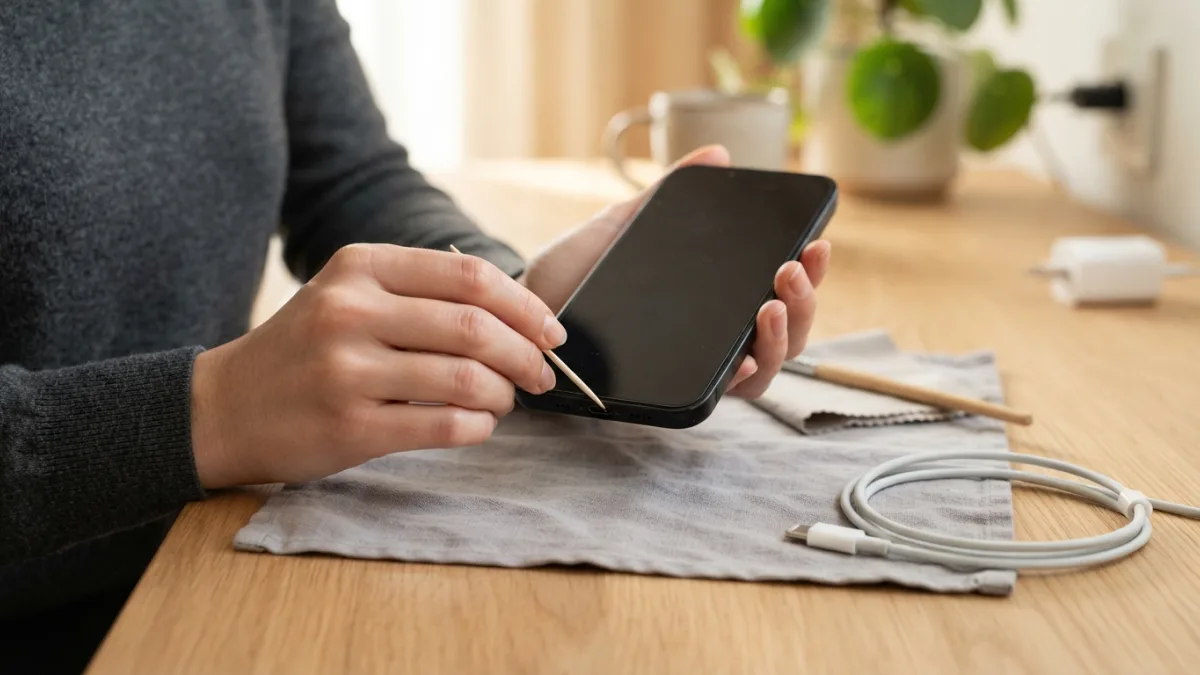
If swapping cables doesn’t help, turn your attention to the charging port itself. Pocket lint, sand, and general grime collect inside that small opening more easily than most people expect, and even a thin layer can prevent the connector from making contact. Power off your iPhone completely before you start, then use a soft-bristled brush, a wooden toothpick, or a can of compressed air to gently clear out debris. Avoid metal tools, pins, or anything sharp, since scratching the internal contacts can cause permanent damage. Hold your phone with the port facing downward while you work so loosened particles fall out instead of settling deeper inside. This single step resolves a surprising number of charging port issues, particularly for people who carry their phones in pockets or bags without a case. Keeping iphone wont charge in mind here will save you time later on.
3. Try a Different Power Source
Sometimes the problem isn’t your phone or your cable at all, but the outlet or USB port you’re plugging into. Wall sockets can lose power delivery over time, and USB ports on computers, especially older ones, often supply less current than a dedicated wall adapter. Test your setup by plugging your iPhone into a different outlet, a different wall charger, or a powered USB hub. If you normally charge from your car or a laptop, try a standard wall adapter instead to rule out a weak power supply. This troubleshooting step takes less than a minute and quickly tells you whether the issue lies with your charging accessories rather than the device itself. This connects closely with another common issue — see How to Fix an iPhone That Won't Turn On for more on that. This detail matters more than it seems once iphone wont charge comes up again.
4. Restart Your iPhone
A simple restart resolves more tech problems than most people give it credit for, and charging issues are no exception. Software occasionally hangs in a way that stops your iPhone from correctly detecting power input, even though the hardware itself works fine. Press and hold the side button along with either volume button until the power-off slider appears, then swipe to shut the phone down completely. Wait about thirty seconds, turn it back on, and plug it in again once it has fully booted. If your screen is too unresponsive to complete a normal restart, a forced restart, which varies slightly by iPhone model, can help. Apple’s own iPhone charging troubleshooting guide outlines the exact button combinations for each device generation. It is one of those small things that makes iphone wont charge easier to manage overall.
5. Update Your iOS Software
An iphone software update charging fix might sound unlikely, but outdated iOS versions occasionally contain bugs that affect power management and battery reporting. Apple regularly patches these issues, so running an old version of iOS increases your odds of running into a glitch that’s already been fixed for everyone else. Go to Settings, then General, then Software Update, and install anything available, assuming your phone has enough charge left to do so or is connected to power even briefly. If your battery is too low to power through an update, try charging it in short bursts using a different cable or outlet first. Keeping your software current also improves overall iphone battery not charging behavior over time, since Apple continually refines how the battery communicates with the operating system. This is a common part of dealing with iphone wont charge, and it is worth keeping in mind.
6. Inspect for Physical Damage or Liquid Exposure
If none of the steps above make a difference, take a closer look for signs of physical damage or moisture inside the port. A phone that’s been dropped, exposed to rain, or splashed with a drink can develop corrosion or bent components inside the charging port, even if the exterior looks fine. Check for a greenish residue, a strange odor, or visible bending around the port opening. If you suspect liquid got inside, don’t plug the phone in at all, since this can cause a short circuit or further damage. Instead, let it sit in a dry, room-temperature environment for at least 24 hours before attempting to charge it again. Continuing to force a charge on a water-damaged port often turns a fixable problem into an expensive one. You might also find our article on iPhone Battery Dying Too Fast? Try These Simple Fixes helpful here. Many people run into this exact issue with iphone wont charge at some point.
7. Reset Settings or Visit Apple Support
When cleaning, swapping cables, and restarting all fail, a deeper software reset might be the answer. Go to Settings, then General, then Transfer or Reset iPhone, and choose Reset All Settings, which clears customized preferences without deleting your photos, apps, or messages. This can resolve stubborn glitches tied to battery calibration or power management that a simple restart doesn’t touch. If your iPhone still refuses to charge after trying every fix on this list, it’s time to get a professional opinion rather than keep guessing. Apple Stores and authorized service providers can run diagnostic tests to check whether the battery, charging chip, or logic board needs repair or replacement, especially if your phone is still under Apple’s warranty coverage. Keeping iphone wont charge in mind here will save you time later on.
When to Seek Professional Repair
Not every charging problem can be solved at home, and that’s completely normal for a device with as many small components as a smartphone. If your iPhone shows the charging symbol but the battery percentage never rises, or if it charges only when the cable sits at a very specific angle, that usually points to internal port damage that needs hands-on repair. Similarly, a battery that drains unusually fast even after a full charge may simply be reaching the end of its lifespan, which typically happens after a few years of daily use. Apple lists authorized service providers on its website, and many offer same-day battery replacements for older iPhone models. Trying to force a fix on a genuinely damaged component risks turning a simple repair into a much costlier one, so know when it’s time to hand the problem to a technician. This detail matters more than it seems once iphone wont charge comes up again.
Charging failures feel alarming in the moment, but they’re rarely a sign that your phone is beyond saving. Working through these seven fixes in order, starting with the simplest checks like cables and power sources before moving to software resets, gives you the best chance of solving the issue without spending a dime. Keep your cables in good condition, clean your charging port every few months, and stay current with iOS updates to avoid running into the same problem again down the road. A little routine maintenance goes a long way toward keeping your iPhone charging reliably for years. For a related walkthrough, check out How to Fix an iPhone Stuck on the Apple Logo. It is one of those small things that makes iphone wont charge easier to manage overall.
Frequently Asked Questions
Why does my iPhone say it’s charging but the battery percentage isn’t going up?
This usually points to a weak or inconsistent connection caused by a damaged cable, a dirty charging port, or a low-output power source. Try a different certified cable and a standard wall adapter before assuming there’s a deeper hardware problem. This is a common part of dealing with iphone wont charge, and it is worth keeping in mind.
Can a software update really fix iPhone charging problems?
Yes, in some cases. Apple occasionally releases updates that address bugs affecting battery reporting and power management, so keeping your iOS version current can resolve charging issues tied to software rather than hardware. Many people run into this exact issue with iphone wont charge at some point.
Is it safe to clean my iPhone’s charging port myself?
It’s generally safe if you use gentle tools like a soft brush or compressed air and avoid metal objects that could scratch the internal contacts. Always power off the phone first and work carefully to avoid pushing debris deeper into the port. Keeping iphone wont charge in mind here will save you time later on.
How do I know if the problem is my cable or my iPhone?
Test with a different certified cable and charger on the same device. If the phone charges normally with a different cable, the original accessory was likely the problem rather than the iPhone itself. This detail matters more than it seems once iphone wont charge comes up again.
When should I take my iPhone to a repair shop instead of troubleshooting at home?
If you’ve tried a different cable, cleaned the port, restarted the device, and updated the software without success, it’s time to get a professional diagnosis. Signs of liquid damage or physical damage to the port also call for expert repair rather than a DIY fix. It is one of those small things that makes iphone wont charge easier to manage overall.


One Comment
Comments are closed.